Unable to Connect the Wi-Fi Garage Door Opener to Home Wi-Fi Network Overview
As you set up your Wi-Fi garage door opener with a home Wi-Fi network, you will hear a progression of beeps from the garage door opener and the LED light behind the black adjustment button will blink/flash in sequence while connecting. Troubleshooting depends on the number of beeps the opener gives off or which color and how the LED lights flash when it stops.
What to Verify First
Location of the LED Indicator Light
Verify the color and status of your garage door opener's LED indicator light, or the number of beeps, and utilize the chart and article resources below to troubleshoot the Wi-Fi garage door opener's connection status.
Garage Door Openers
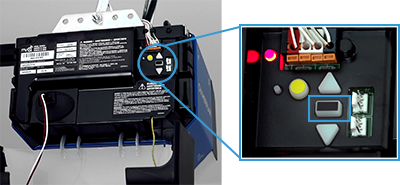
Wall-Mount Garage Door Openers
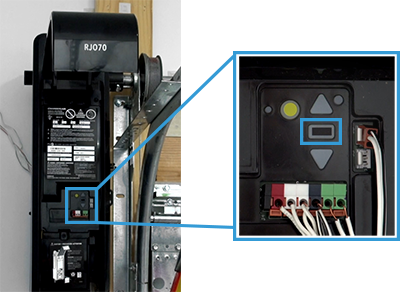
Example of flashing LED light:
Verify you are inputting the correct password for your home Wi-Fi network in the myQ app
- Make sure that you aren't auto-populating or copying and pasting your password. This could add a space to the end of the password causing the hub not to connect to your router.
- If you are unsure of your network password and it's never been changed, it may be located on a sticker on your router.
- If you are still unsure of the password, contact the router manufacturer.
| LED Light | Number of Beeps | Connection Status | Troubleshooting Resource(s) |
|---|---|---|---|
Unlit LED, No Blinking/Flashing |
No beep | No power to device | Unable to Connect the Wi-Fi Garage Door Opener to Wi-Fi Network and There is No LED Light |
Blinking/Flashing Blue |
No beep | Unable to connect to your home Wi-Fi network | Unable to Connect the Wi-Fi Garage Door Opener to Wi-Fi Network and LED Light Flashes Blue |
Solid Blue |
No beep | Unable to connect to your mobile device | Unable to Connect the Wi-Fi Garage Door Opener to Wi-Fi Network and LED Light is Solid Blue |
Blinking/Flashing Blue and Green |
One (1) beep | Unable to connect to your home Wi-Fi router | Unable to Connect the Wi-Fi Garage Door Opener to Wi-Fi Network and LED Lights Flash Blue and Green |
Blinking/Flashing Green |
Two (2) beeps | Unable to connect to myQ internet server | Unable to Connect the Wi-Fi Garage Door Opener to Wi-Fi Network and LED Light Flashes Green |
Solid Green |
Three (3) long beeps | Connected to myQ server, but device not added to myQ account | Unable to Connect the Wi-Fi Garage Door Opener to Wi-Fi Network and LED Light is Solid Green |
Note: Chamberlain Group Technical Support does not troubleshoot routers. See the link to the article resource listed below for the required router settings for your Wi-Fi router. If additional assistance is needed to access a home Wi-Fi router, please contact the router's manufacturer. For more help, see Recommended Router Settings for the myQ Wi-Fi Products
https://support.chamberlaingroup.com/s/article/Unable-to-connect-the-Wi-Fi-Garage-Door-Opener-to-home-Wi-Fi-network-Overview